
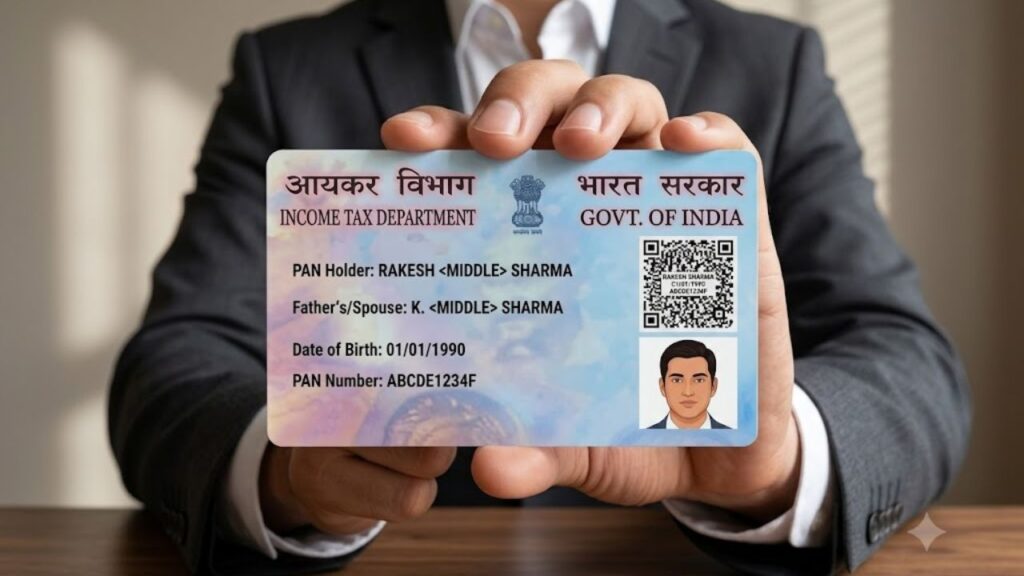
A PAN (Permanent Account Number) is one of the most important identity documents for financial and tax-related activities in India. Whether you are filing Income Tax Returns (ITR), opening a bank account, investing in mutual funds, or applying for a loan, your PAN card is required in many situations.
If you have recently applied for a PAN card or misplaced your physical PAN card, you don’t have to wait for a duplicate copy. You can easily download your e-PAN online from the NSDL or UTIITSL portal within a few minutes.
In this guide, you’ll learn everything about downloading an e-PAN card, eligibility, required details, charges, password, and how to update your PAN details.
What is an e-PAN Card?
An e-PAN is a digitally signed electronic version of your PAN card issued by the Income Tax Department. It contains the same information as your physical PAN card and is equally valid for most official purposes.
The e-PAN is provided in PDF format and can be downloaded online.
What is a PAN Card?
A Permanent Account Number (PAN) is a unique 10-character alphanumeric identification number issued by the Income Tax Department of India.
Example:
ABCDE1234F
A PAN card helps the government track financial transactions and is mandatory for many banking and taxation purposes.
Why is PAN Card Important?
A PAN card is required for many financial activities, including:
- Filing Income Tax Returns (ITR)
- Opening a bank account
- Applying for loans
- Investing in mutual funds
- Buying or selling property
- Opening a Demat account
- Receiving taxable income
- High-value financial transactions
- KYC verification
Where Can You Download e-PAN?
You can download your e-PAN from either of these official portals:
- NSDL (Protean eGov Technologies)
- UTI Infrastructure Technology and Services Limited (UTIITSL)
The portal depends on where your PAN application was originally processed.
How to Download e-PAN from NSDL?
If your PAN card was issued through NSDL, follow these steps:
Step 1: Visit the official NSDL e-PAN download page.
Step 2 :Choose one of the following options:
- PAN Number
- Acknowledgement Number
Step 3: Enter the required details:
- PAN Number
- Aadhaar Number
- Date of Birth
- GSTIN (Optional)
How to Change Photo and Signature in PAN Card Online (Complete Step-by-Step Guide)
Step 4: Accept the declaration.
Step 5: Complete the CAPTCHA verification.
Step 6: Click Submit.
Step 7: Verify the OTP sent to your registered mobile number.
Step 8: Your e-PAN PDF will be available for download.
How to Download e-PAN Using Acknowledgement Number?
If you recently applied for a PAN card, you can also download your e-PAN using the acknowledgement number.
Simply:
- Select Acknowledgement Number
- Enter the acknowledgement number
- Verify OTP
- Download your e-PAN PDF
How to Download e-PAN from UTIITSL?
If your PAN application was processed by UTIITSL, follow these steps:
Step 1: Open the official UTIITSL e-PAN download page.
Step 2: Enter
- PAN Number
- Date of Birth
Step 3: Enter the CAPTCHA code.
Step 4: Click Submit.
Step 5: Verify your identity through OTP.
Step 6: A download link will be sent to your registered:
- Mobile Number
- Email ID
Step 7: Open the link and download your e-PAN.
PAN Card Correction Form: How to Update Name, DOB, Address & Other Details
Password to Open e-PAN PDF
The downloaded e-PAN is password protected.
Usually, the password is:
Date of Birth (DDMMYYYY)
Example:
Date of Birth:
15 August 1998
Password:
15081998
After entering the password, your PAN PDF will open.
Who Can Download an e-PAN?
You can download an e-PAN if:
- Your PAN application was processed through NSDL or UTIITSL.
- Your PAN has already been allotted.
- Your mobile number or email ID is registered.
- Your PAN application is eligible for e-PAN download.
How Many Times Can You Download e-PAN?
Generally:
- Free downloads are available for recently issued PAN cards.
- The download facility is available up to 3 times for eligible applicants.
- After the free download limit or validity period, applicable charges may be required.
Can I Download e-PAN Without a Registered Mobile Number?
No.
OTP verification is mandatory in most cases.
If your mobile number or email is not updated, you should first submit a PAN correction request to update your contact details.
You can also read our detailed guide on PAN Card Correction Form if you need to update your name, date of birth, address, photo, signature, or mobile number.
How to Update PAN Card Information?
If any information on your PAN card is incorrect, you can request a correction online.
You can update:
- Name
- Father’s Name
- Date of Birth
- Address
- Mobile Number
- Email ID
- Photograph
- Signature
PAN Card Correction Form: How to Correct PAN Details Online Without Mistakes
Simply:
- Visit the NSDL or UTIITSL portal.
- Select PAN Correction.
- Fill out the correction form.
- Upload the required documents.
- Submit the application.
Documents Required for PAN Correction
Depending on the correction, you may need:
- Aadhaar Card
- Passport
- Voter ID
- Driving Licence
- Birth Certificate
- Address Proof
- Passport-size Photograph
- Signature
Benefits of e-PAN
Downloading an e-PAN offers several advantages:
- Instant availability
- No need to wait for the physical PAN card
- Digitally signed and valid
- Easy to store on your mobile
- Can be printed anytime
- Accepted for KYC and banking purposes
- Useful if the original PAN card is lost
Common Problems While Downloading e-PAN
Some users may face issues such as:
- Mobile number not registered
- Wrong date of birth
- Incorrect PAN number
- OTP not received
- Browser issues
- PAN not generated yet
- Application processed by another portal
In such cases, verify your details and try again later.
How to Link Aadhaar to PAN Online in 2025 – Step-by-Step Guide
Difference Between Physical PAN and e-PAN
| Feature | Physical PAN | e-PAN |
|---|---|---|
| Format | Plastic Card | PDF File |
| Delivery | By Post | Instant Download |
| Validity | Valid | Equally Valid |
| Signature | Printed | Digitally Signed |
| Storage | Physical | Mobile/Computer |
Conclusion
Downloading an e-PAN card is a quick and convenient process that saves time and eliminates the need to wait for a physical PAN card. Whether your PAN was issued through NSDL or UTIITSL, you can easily download the digitally signed PDF by verifying your identity through OTP. If you face any issues due to outdated personal details, make sure to update your information through the PAN correction process before attempting to download the e-PAN again.
FAQs
Based on Google's Helpful Content System, this article emphasizes user value, transparency, and accuracy. It incorporates principles of E-E-A-T (Experience, Expertise, Authoritativeness, Trustworthiness).
Why Choose Sarkari Bakery?
Reliable guidance to help you understand government schemes, online applications and essential digital services.
Official Information
Information presented with relevant official sources wherever available.
Step-by-Step Guides
Clear instructions to understand application procedures and requirements.
Regular Updates
Helpful updates and guidance when information changes or becomes available.
People-First Content
Practical explanations designed around the questions citizens commonly ask.
GOOGLE BUSINESS PROFILE
Explore Our Profile
Visit our Google Business Profile to check the latest available business information and customer reviews.
View Google ReviewsPlease check Google for the current rating and available reviews.
Pingback: How to Change Photo and Signature in PAN Card (Online & Offline – Complete Guide) - Sarkari Bakery
Pingback: PAN Card Correction – Process, Steps & Key Details Online
Pingback: How to Change Photo and Signature in PAN Card – Explained
Pingback: e-PAN vs Physical PAN: Difference, Validity, Uses & Which One Is Better - Sarkari Bakery
Pingback: Forgot PAN Number: How to Find Your PAN Number Online - Sarkari Bakery
Pingback: Lost PAN Card: How to Get a Duplicate or Reprinted PAN Card Online - Sarkari Bakery